Here we are taking into account that we have a database by the name of db2 whose backup is available with us as backupset.
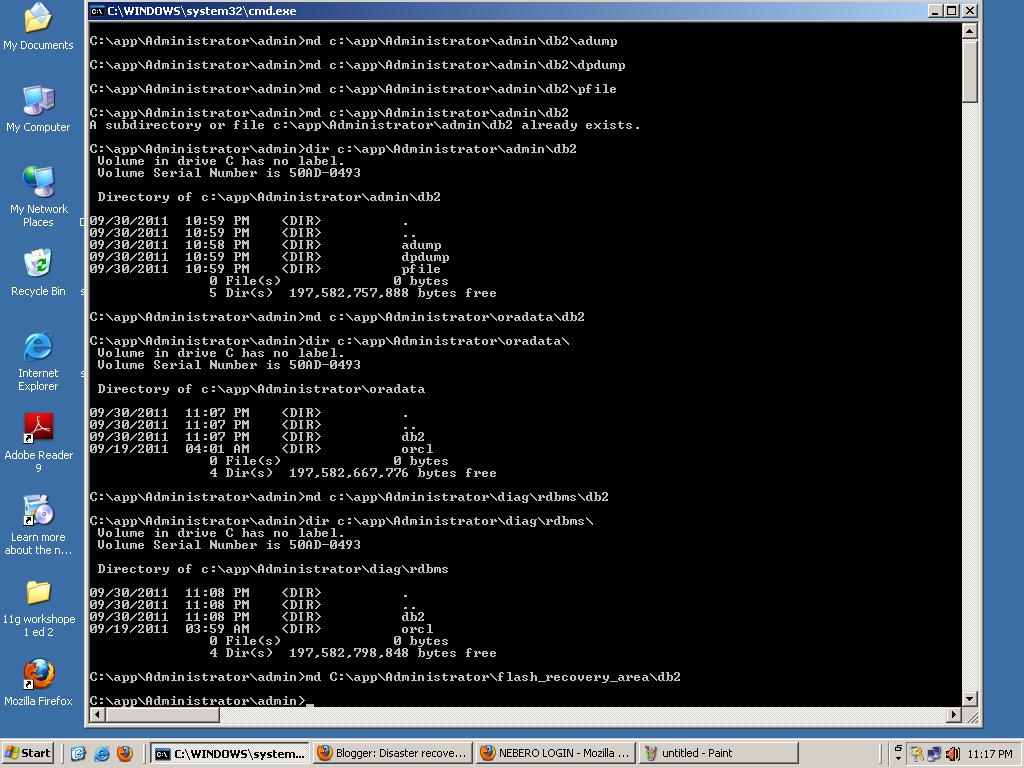
First create in the folder C:\app\Administrator\admin\ folders called db2 and within db2 create three other folders called adump, dpdump and pfile.
Create a folder called db2 inside the C:\app\Administrator\flash_recovery_area and within it create a folder called backupset.
Inside the C:\app\Administrator\oradata create a folder called db2.
Create db2 folder inside C:\app\Administrator\diag\rdbms path

Copy the backup set files from your backup location to "C:\app\Administrator\flash_recovery_area\db2"
In windows platform create a service named DB2 using the oradim utility:

If you check the services.msc you will find the OracleServiceDB2 in it.
Create a password file for db2 database using the orapwd command:

Startup the database using the pfile we created in Step 2

Restore the controlfile from the latest backuppiece which you have:

Bring the database to mount state using the controlfile we have just restored:

Restore the database using RMAN

Bring the database to open mode using SQL:

Check the status of the database to verify:

Step 1:
First create in the folder C:\app\Administrator\admin\ folders called db2 and within db2 create three other folders called adump, dpdump and pfile.
Create a folder called db2 inside the C:\app\Administrator\flash_recovery_area and within it create a folder called backupset.
Inside the C:\app\Administrator\oradata create a folder called db2.
Create db2 folder inside C:\app\Administrator\diag\rdbms path
Step 2:
Create a file called "initdb2.ora" with the following entries:
*.db_name='db2'
*.db_block_size=8192
*.db_recovery_file_dest='C:\app\Administrator\flash_recovery_area'
*.db_recovery_file_dest_size=4102029312
Step 3:
Step 4:
In windows platform create a service named DB2 using the oradim utility:
If you check the services.msc you will find the OracleServiceDB2 in it.
Step5:
Create a password file for db2 database using the orapwd command:
Step5:
Startup the database using the pfile we created in Step 2
Step6
Restore the controlfile from the latest backuppiece which you have:
Step7
Bring the database to mount state using the controlfile we have just restored:
Step8
Restore the database using RMAN
Step9:
Bring the database to open mode using SQL:
Step10:
Check the status of the database to verify:


No comments:
Post a Comment